My Workflow
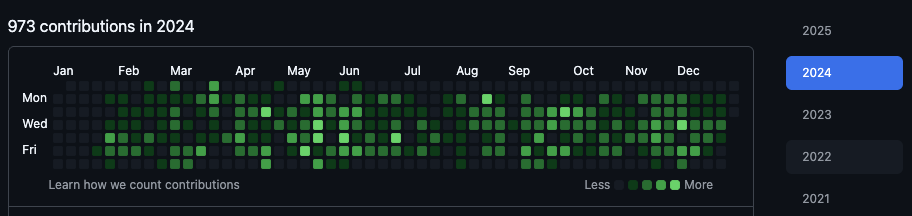
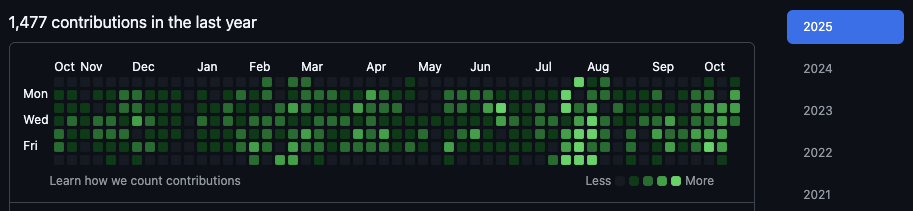
Over the past year, AI has become a core part of how I work. Rather than treating it as a novelty, I've spent time learning to use it efficiently — studying different prompting techniques, discovering what kinds of tasks AI handles well versus poorly, and building structured workflows around its strengths. The result is that I get significantly more done per day, with AI handling the repetitive and mechanical parts of development so I can stay focused on architecture, product decisions, and code quality. The rest of this section describes the specific tools and systems I've built around that philosophy.
Obsidian as a Second Brain
My entire knowledge base lives in an Obsidian vault — SwiftUI patterns, Japanese study notes, car records, project todos, engineering references, and curated shortcut sheets for Xcode, macOS, shell, and Chrome, all in one place. Keeping shortcuts written down and readily accessible means less time spent remembering key bindings and more time in flow. The vault is stored in iCloud Drive for seamless sync across all my devices, and also pushed to GitHub as a version-controlled backup. A root-level index.md lists every note with a one-line summary, making lookup fast without scanning the entire vault. Since everything is stored as plain Markdown files on disk, the vault works fully offline — I can browse and read my notes anytime without an internet connection, and Claude Code can read directly from it the same way, treating it as a local knowledge base that's always available regardless of connectivity.
Vault-Powered Claude Code
My global AI configuration is managed entirely from within the vault. ~/.claude/CLAUDE.md (which tells Claude Code how to behave across all projects) is a symlink pointing to Setup/CLAUDE.md inside the vault. Likewise, ~/.claude/commands/ is symlinked to the vault's Claude Code Commands/ folder — so every custom slash command is just a Markdown file in Obsidian. Editing a command in the vault makes it instantly available in Claude Code with no restarts or manual syncing needed.
Custom Slash Commands
A library of custom slash commands drives the full development lifecycle:
- /start-claude — loads project context, reads the relevant CLAUDE.md files, and explores the codebase before any session begins
- /work-on-todos — reads all vault todo lists across every project, spawns up to 3 parallel Ghostty terminal sessions (one per repo), implements features autonomously using Claude Code, commits each change, and creates a pull request per task — all without switching windows manually
- /commit — stages changes and creates a commit following project-specific conventions
- /create-pr — pushes the branch and opens a pull request with a structured description
- /commit-then-deploy — commits all changes and deploys to Firebase Hosting in a single command
- /whats-our-todos — surfaces all pending tasks across every project's todo file in the vault
- /add-knowledge — saves a new learning or pattern directly into the vault so it's available in future sessions
- /orchestrate-build-uploads-ios-android — ships every app on both platforms in one run: builds signed Android AABs and uploads them to Google Play internal testing via fastlane, then version-bumps, tags, and pushes each iOS app so Xcode Cloud delivers it to TestFlight
Working as a Product Engineer (PdE)
At work I currently take on a Product Engineer (PdE) role — a hybrid of project manager and engineer, where one person carries a feature from definition all the way to release instead of handing it off between roles. In practice that means writing and refining the product spec, keeping the product spec checklist up to date as decisions change, implementing the feature myself, coordinating with QA on what needs to be verified and how, and driving the release checklist before ship.
This setup is still a pilot on the Mercoin client team, and I was the second person to try it. What makes it interesting is how much it changes the shape of the work: because the same person owns both the spec and the code, ambiguity gets resolved while it is still a question rather than surfacing later as a bug, and the release checklist becomes a real quality gate instead of a formality. The most valuable part has been learning the process end to end — the checkpoints, the review points, and who signs off on what — since the entire point of it is to make sure nothing ships with bugs.
Git Worktrees for Parallel Ticket Work
At work, I maintain up to 10 active git worktrees simultaneously, each on its own branch and ticket. This lets me switch context instantly — no stashing, no waiting for builds to settle — while AI agents work independently in each worktree. Two custom commands keep this manageable:
- /show-worktrees — lists all active worktrees with their branch, status, and associated ticket at a glance
- /cleanup-worktrees — resets a finished worktree by detaching its HEAD, freeing the branch name so a fresh branch can be checked out there for the next ticket without deleting and recreating the worktree
Since the project uses Bazel as its build system, all worktrees are configured to share the Bazel cache of the main repository. This means 10 worktrees do not mean 10× the storage — incremental build artifacts are reused across all of them, keeping disk usage lean while still getting full parallel builds.
Expanding into Android with AI
AI hasn't just made me faster at iOS — it has expanded what I can build. In 2026 I started Android development, and with AI-assisted workflows flattening the Kotlin and Jetpack Compose learning curve, I was able to move at a pace that would have taken far longer on my own. I created my own Google Play Store developer account and uploaded four Android apps — Chatzone, Earnings, Savings, and Tally — learning the full publishing pipeline along the way: app signing, release tracks, store listings, content ratings, and Play Console review. It was a genuinely fun experience, and it means I can now deliver the same product on both iOS and Android. Along the way I learned how Google Play's testing tracks really work as a pipeline: internal testing (effectively Android's TestFlight — builds visible only to opted-in testers, installed through the real store), then closed testing (where a new developer account must maintain 12+ opted-in testers for a continuous 14-day window before it can even apply for production access), and finally production. It's a far more gated path than the App Store's, and understanding it end-to-end now shapes how I plan every release.
One-Command Release Trains
On release days, a single custom command — /orchestrate-build-uploads-ios-android — ships every app on both platforms in one run. In one session it released six builds: three Android apps built as signed AABs and uploaded to the Google Play internal testing track, and three iOS apps version-bumped, tagged, and handed to Xcode Cloud for TestFlight delivery. The two pipelines could not be more different, and the command encodes both: Android releases go through fastlane supply, authenticated with a Google Play service account (a JSON key with account-level access to the Play Android Developer API), which makes uploading builds, store listings, screenshots, and changelogs fully scriptable; iOS releases are triggered purely by pushing a release tag, with Xcode Cloud building in the cloud and injecting production signing keys through CI environment variables — no local archive ever needed. Hard-won details are captured in a vault playbook the command reads before acting: Play's strict first-upload ordering (the first AAB must land on a track before any store listing can attach to it), upload-keystore management with Play App Signing, the new-app review submission flow, and the realization that internal testing is effectively Android's TestFlight — builds visible only to opted-in testers, installed through the real store. Every release train benefits from the lessons of the previous one.
Everything Connected
The vault is the single source of truth for both human knowledge and AI behavior. When Claude Code needs context — architecture patterns, project conventions, or past decisions — it reads the vault first. New learnings flow back into the vault so they're available in every future session. This creates a feedback loop where the AI gets more effective over time, grounded in real project history rather than starting fresh each conversation.